Obsidian’s file explorer sorts folders alphabetically. The sort menu offers file name, modified time, and created time, and nothing else. There is no built-in way to arrange folders by hand.
For my Obsidian vault, I like to see the organization in a specific way. For example, I like to keep the inbox folder at the top since it contains files I capture quickly for any reason during the day.
I also have a _meta/ folder where I keep a short note on how my vault’s folder structure is organized and why it is that way, along with my templates. This folder isn’t part of the main structure, but seeing it at the top irks me a little every time I open the Obsidian app.
Another folder I have is archive, which I want to be the last folder in my structure. Its only use is to keep retired notes that I don’t want to delete yet.
Overall, here’s the structure I have in mind:
inbox
notes
sources
blog
projects
journal
writing
archive
... any other folder
I have written why I organize my vault this way in A minimal Obsidian vault structure that sticks.
And the current structure of my vault looks like this:
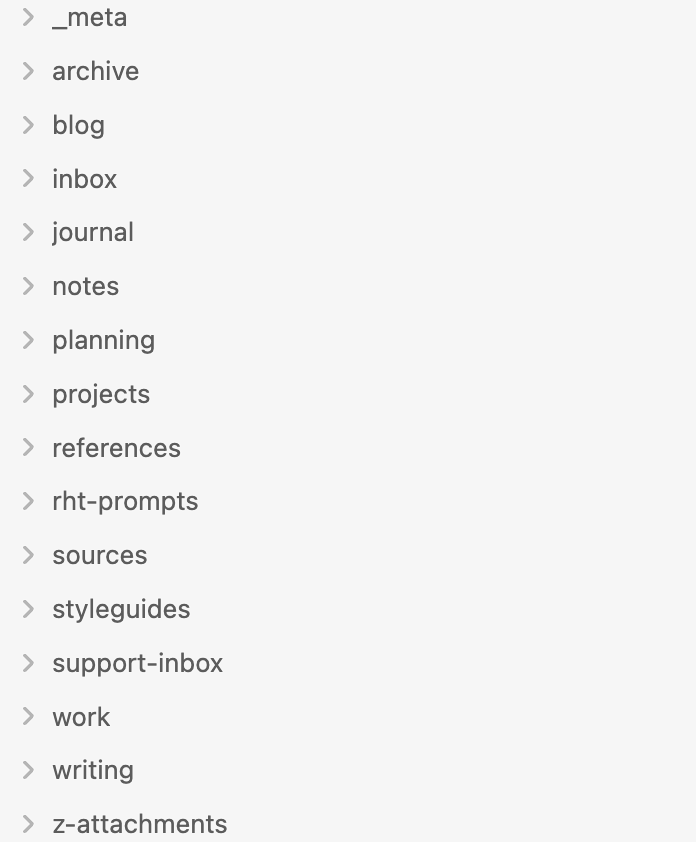
The fix is to use the Custom File Explorer sorting plugin, which has around 184k downloads, so it seems like a popular plugin. However, I came across it for the first time only recently, probably because I accepted a long time ago that there was no way to custom sort folders in Obsidian. In previous versions of my vault, I relied on emojis.
To install it, open Settings, select Community plugins, and choose Browse. Search for “Custom File Explorer sorting”, install it, and enable it. The plugin adds an up-and-down arrows icon to the ribbon.

The icon is a toggle and it being grayed out means the plugin is suspended and the sidebar falls back to Obsidian’s default sorting, highlighted means the custom order is active.
There is no drag-and-drop settings screen. Instead, the plugin reads the order from a regular note, which suits a vault that lives in git: the sidebar order becomes a versioned file like everything else. I created the note at _meta/sortspec.md and declared the order inside a sorting-spec frontmatter property:
---
sorting-spec: |-
  target-folder: /
  inbox
  notes
  sources
  blog
  projects
  journal
  writing
  archive
---
The target-folder: / line scopes the rules to the vault root. The lines after it are folder names, top to bottom, in the exact order I want them in the sidebar. Any folder I leave out keeps the default alphabetical sorting and lines up below the listed ones. That covers the “any other folder” part of my list without any extra configuration.
The Custom File Explorer sorting plugin has made a huge difference in organizing my notes inside my Obsidian vault.