I have both Claude Code CLI and Codex CLI installed on my local machine. I often use Codex to code review or tighten the code on something I am working on. Claude has a better a terminal UI, which is not only pleasing to use, but it respects my terminal app’s theme. Switching between both CLIs and then finding a way to write prompts wasn’t fruitful. So I created a Skill in Claude Code to allow me to use Codex CLI in a headless way.
Codex has a non-interactive mode that can be enabled using codex exec. It dumps output in stdout. This is what makes it possible to use inside Claude Code CLI.
All of this is possible by creating a Skill inside Claude Code. A Skill is basically a markdown file (SKILL.md) with some frontmatter at the top and instructions in the rest of the file. You can think of it as a task that has a bunch of instructions on what to do, how to do it, and what not to do. I also think of them as recipes where I want Claude Code to perform a task by following a bunch of steps.
In Claude, you can have global-level skills and project-level skills. I created this new skill as a global one so I could trigger it in any project I want. All global level skills in Claude live ~/.claude/skills/your-skill-name/, where your-skill-name is that global or project level skill’s directory.
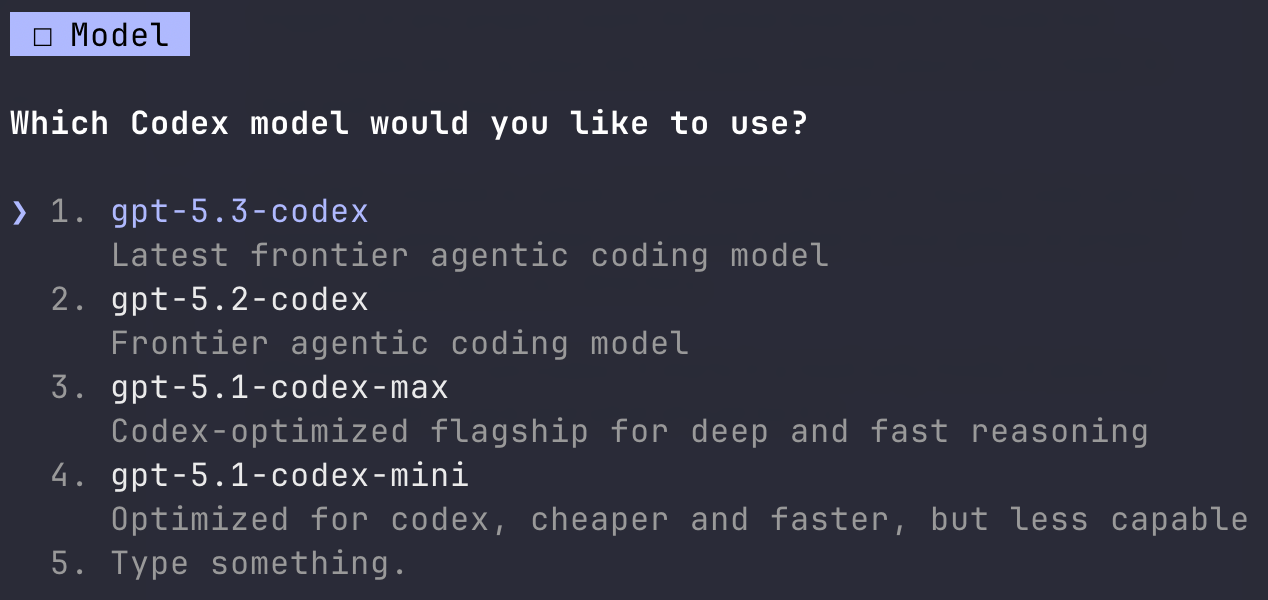
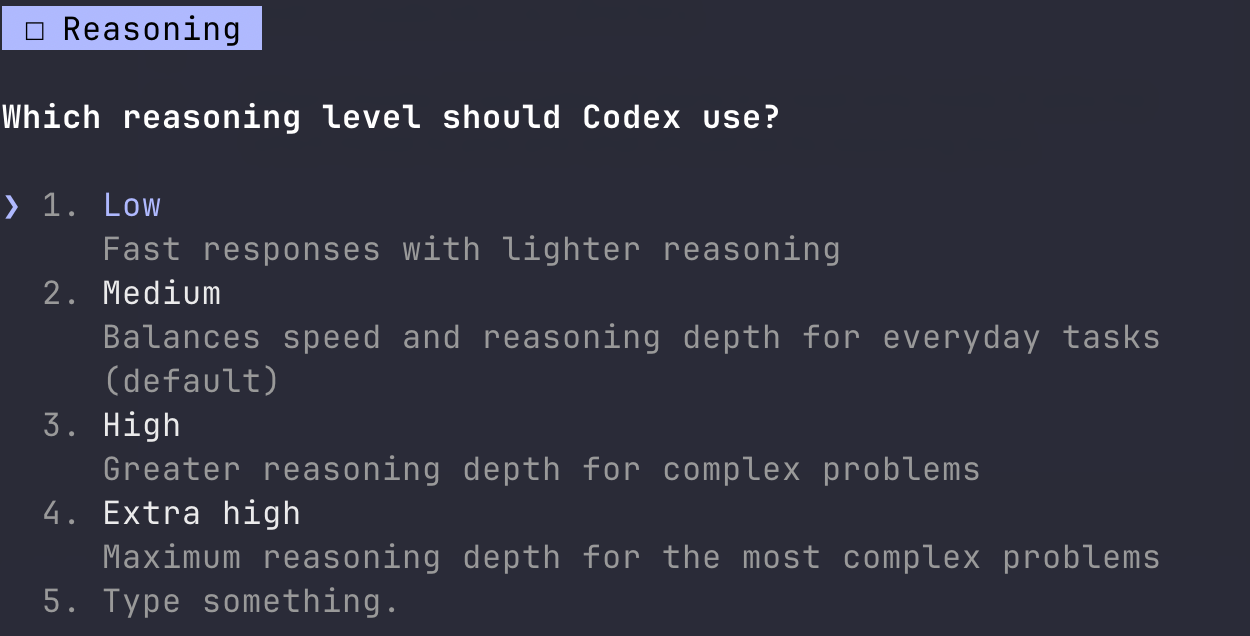
The skill is called /run-codex. A skill in Claude Code can be triggered using a /. When I invoke /run-codex, it starts in a read-only mode. It asks me which model to pick and what should be its reasoning level.
Here’s some screenshots of when I invoke this skill:
Then, it provides three ways I can use it:
- Code Review
- Refactoring Suggestions
- Code Editing
In the above screenshots you are seeing that invoking the skill, Claude Code is asking me a bunch of questions. This is essential since codex exec runs silently in background. Without passing any user input, it won’t know how to proceed.
All of this interactivity comes from Claude’s side. I do have these questions in a specific order so Claude Code always follows it. Asking such questions inside Claude Code is possible because of AskUserQuestion, which is a built-in tool that Claude Code can access. This tool lets Claude Code present the user with a question and a set of options. You can invoke this tool inside your SKILL.md file and then define the options.
Here’s the reasoning level step defined in my skill’s file. It asks Claude Code to invoke AskUserQuestion to allow me to select a reasoning level for the model I selected in the previous step:
### Step 2 - Reasoning Level

Use AskUserQuestion to ask which reasoning level to use. This maps to the `model_reasoning_effort` config. Options:

- **Low** - Fast responses with lighter reasoning

- **Medium** - Balances speed and reasoning depth for everyday tasks (default)

- **High** - Greater reasoning depth for complex problems

- **xhigh** - Extra high reasoning depth for complex problems

The selected level is passed via `-c model_reasoning_effort="<level>"`.
Going through this prompt process, you might wonder what is the exact Codex command invoked here. Just for demonstration purpose, I invoked the /run-codex skill inside the open-source repository that I work on at work and this is the exact command:
codex exec -c model="gpt-5.3-codex" -c model_reasoning_effort="xhigh" --sandbox read-only --ephemeral "Review the code in the ui/components/ directory for bugs, quality…An important thing to note here is the --sandbox read-only --ephemeral. The --sandbox read-only tells Codex to run in a sandbox where it can read files but cannot write, create, or delete. This is enforced at the OS level. Think of this as a guard that Codex can’t do anything without your permission other than reading one or many files in your codebase.
The --ephemeral tells Codex not to save the session to disk. Normally, when I run Claude Code or Codex, all sessions are stored in files so you can resume them later using, for example codex --resume command from a terminal window. With --ephemeral passed as an option to codex exec, the session exists only while it runs.
Another thing to note here, since codex exec is now running inside Claude Code, Claude will take care of saving the session and I don’t need two different AI CLI’s to store the same session.
After 14 something minutes, I had the result with me. The code review part was done on a specific directory where the repository has most of its UI components. A comparison table is provided at the end when code review analysis is done by Codex. In my skill file, for this specific task, I also have instructions for Claude Code to do its own analysis and then compare its results with Codex’s output.
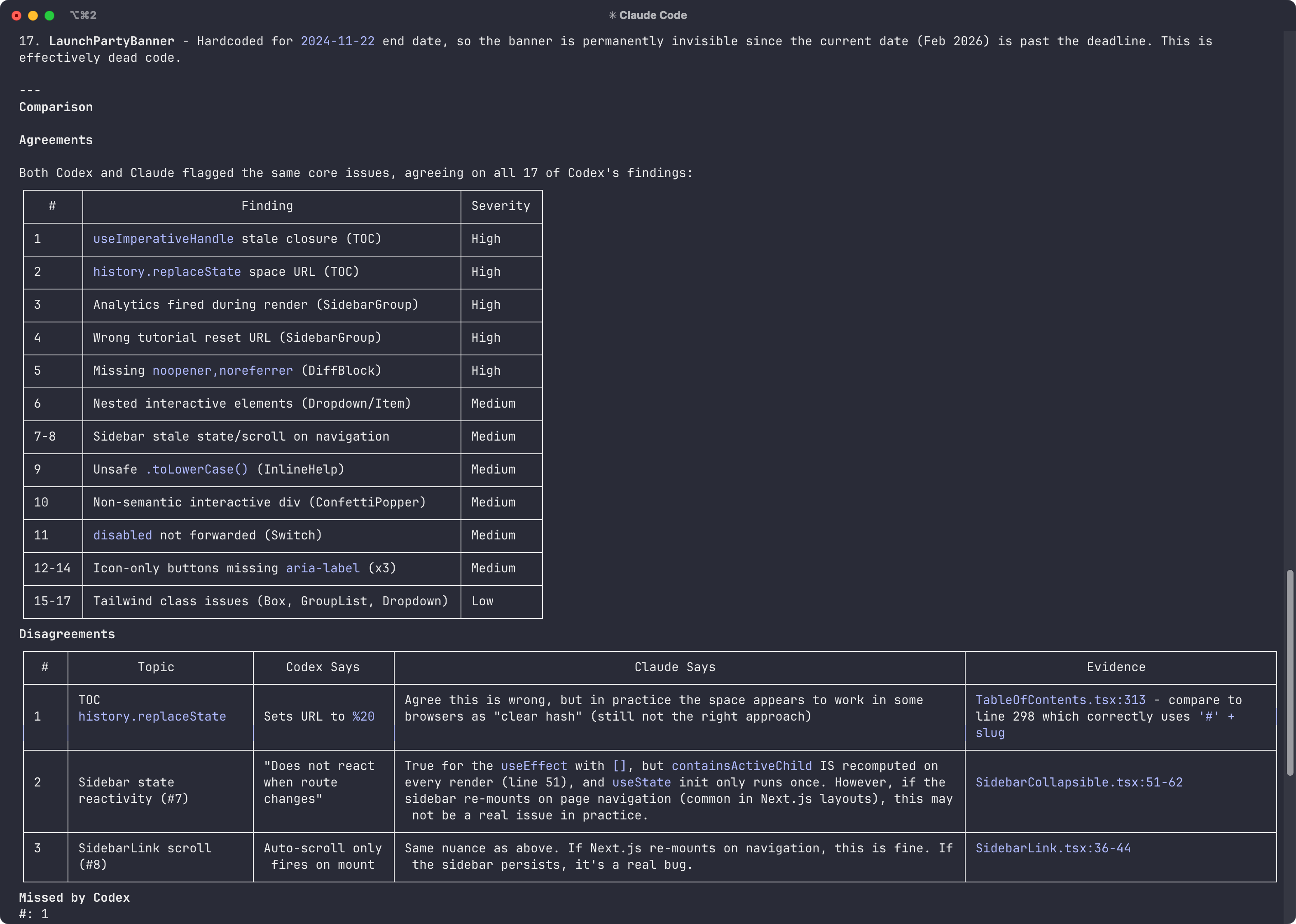
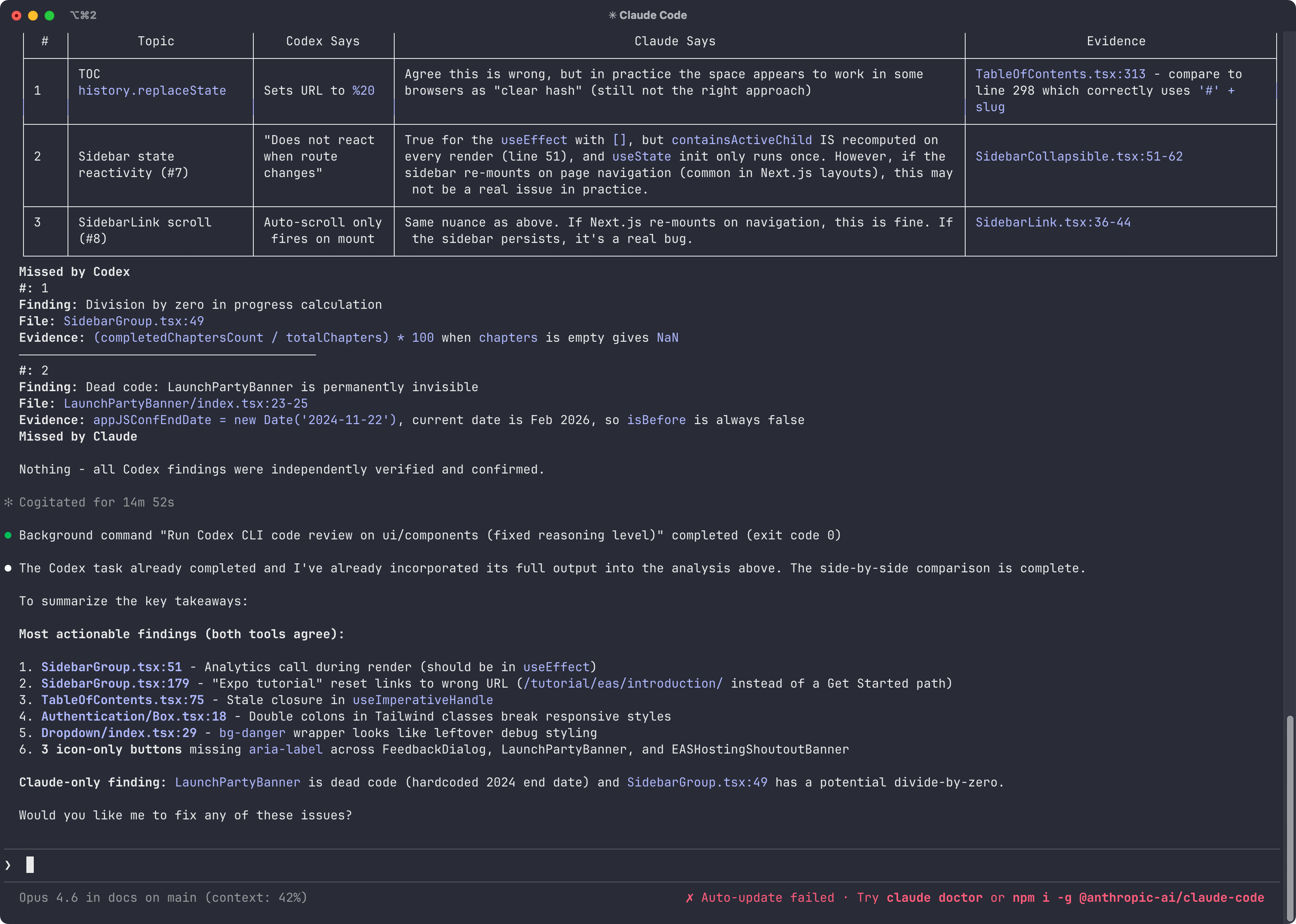
I think the code review is a fair report. Before running this, I was aware that there is some dead code. I am glad Claude Code picked it up while Codex couldn’t. Another thing I want to highlight is that the Claude Code’s way of presenting the final report in markdown (especially the tables) is much more cleaner than in Codex CLI (at least at the time of writing this post, where codex is versioned at 0.99).
When creating /run-codex skill, I use Claude Code’s planning mode to figure out how the skill can be structured. I gave it a prompt, fairly based on an idea I had in my mind. Initially, the version of this skill Claude built was wrong. It had wrong Codex model names, and there was no way to select the reasoning level, which is mostly fine. With LLMs stateless nature, I don’t expect them to one-shot the exact result of a given task to be perfect. This also helped me to dive deeper into how skills work and how to make them interactive.
You can build your skills that you expect to use again and that may contain executing a series of tasks. If you use both Claude Code and Codex and prefer Claude Code’s interface, try to build one for your own use case or ask Claude Code to build a skill for one of the most repeatable tasks you do. Claude is usually really helpful in building initial skills. You can always tweak them as you use them. I am going to tweak the /run-codex next time I am using it.
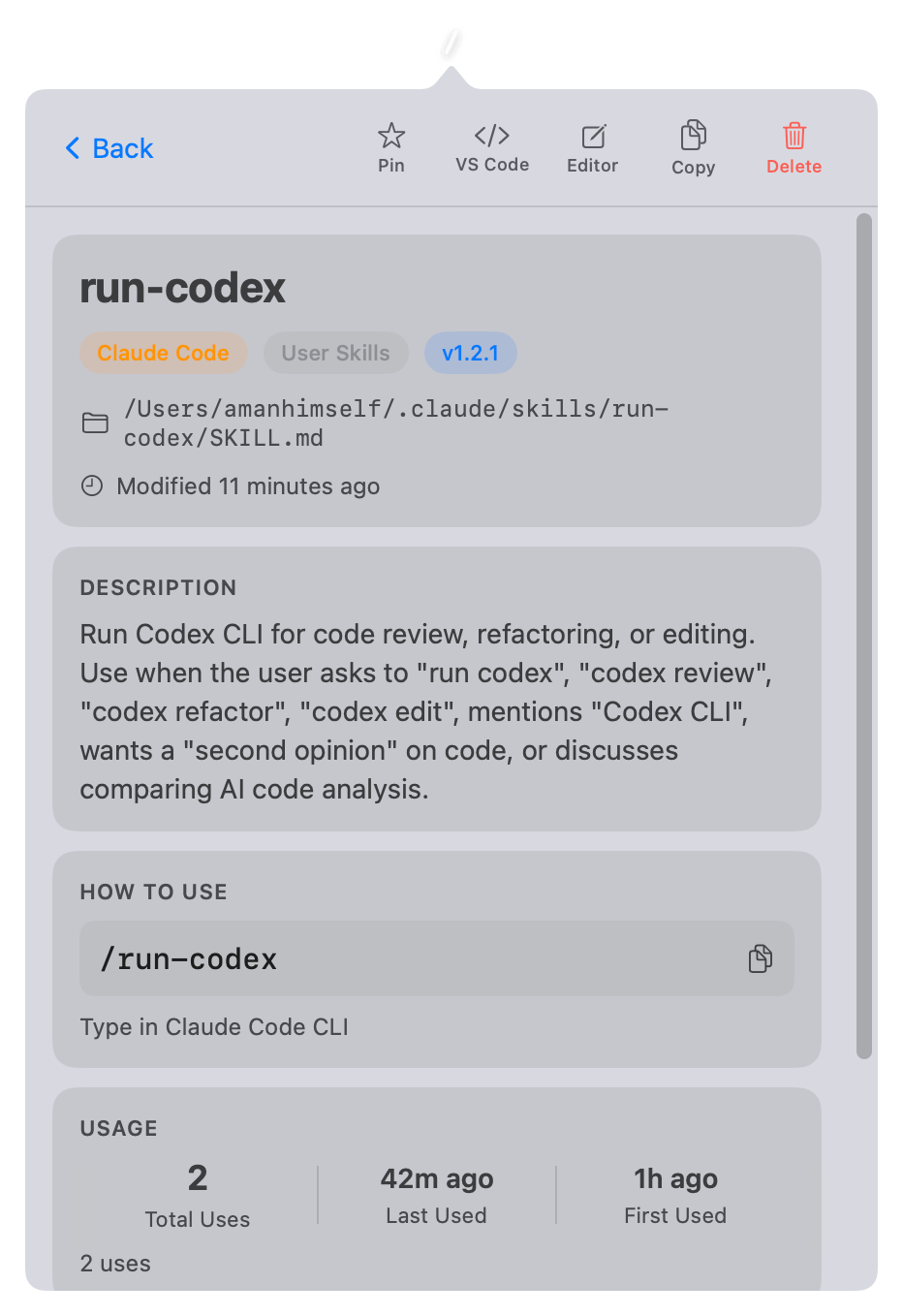
The above screenshot is from SkillsBar, a macOS menu bar app I built to browse and manage Claude Code skills.
